
ID-kontroll documentation
Introduction to “ID-kontroll” - Physical identification proofing service (PIP)
Mobai delivers the service where operators perform physical identity verification in the distribution network of Posten Bring (post offices and “Post i Butikk”). Physical identification proofing service is a service that will replace the existing PUM solution that Posten offers today. The ID-kontroll / PIP will be a continuation of the offerings of a physical identity proofing process throughout a vast distribution network across Norway.
The Physical identification proofing service provides an identity proofing service in Posten Brings distribution network making it easy for the end users to perform an ID proofing across Norway.
The service will enable companies to order an identity proofing of their end-customers to comply with statutory requirements where the end-customer (applicant) is required to meet physically, for instance when issuing of eID, being a secure channel to verify the customer identity or to comply with physical identification in customer due diligence processes in conformity with anti-money laundering regulations.
The Physical identification proofing service (PIP)
PIP is operated by a Registration Officer (i.e., operators performing the physical identity proofing) that uses a mobile app with all the functionalities required to run assisted identity proofing. Mobai provides this service in collaboration with Posten who provides the personnel that executes and performs the identity proofing with the mobile app. The evidence from the proofing is then sent to the PIP-requestor.
How do Mobai conduct the Physical identification proofing
The Physical Identity Proofing service consist of several Manual and Automatic controls. The Registration Officer that has carried out the inspection will confirm this by authentication.
1. Manual verification of the applicant - As part of the Physical Identity Proofing process, several manual verification steps are performed by the authorized operator to ensure that the presented ID and applicant details are consistent and correct.
If you require more detailed information about the specific checks performed, please contact us directly for further documentation.
2. The ID verification service consists of the following components:
a) Document Capture (OCR) - By capturing an image of the document, the elements needed for creating access credentials can be read from the machine-readable zone found on the identity document.
b) Document reading (NFC) - Reads NFC chips and gets data and facial image. During the reading process several security mechanisms will be applied to ensure secure communication between the terminal and the identity document.
c) Verify Authenticity and integrity of Identity Document - The active authentication ensures data is being read from a genuine identity document and protects against someone having cloned the data from another identity document. The passive authentication protocol ensures that data read from the chip is authentic and has been created by a valid authority (e.g., State, or other governmental entity).
d) TOVE register at Police – The service then checks the police register for lost and stolen passports and ID cards.
3. Face verification – Verify whether the document presenter is its legitimate owner, a picture of a person’s face is taken and matched to the ID photo, using our Face Verification algorithms. *Children under 18 to be handled differently.
4. Attestation of the Registration Officer - Verified by name and personal PIN code.
Supported identity documents:
The service will support reading of electronic machine-readable travel documents that conform with ICAO 9303 (standard for such documents).
The service will verify the authenticity of identity documents based on the certificate master lists distributed by the Norwegian Government and The German CSCA Master List.
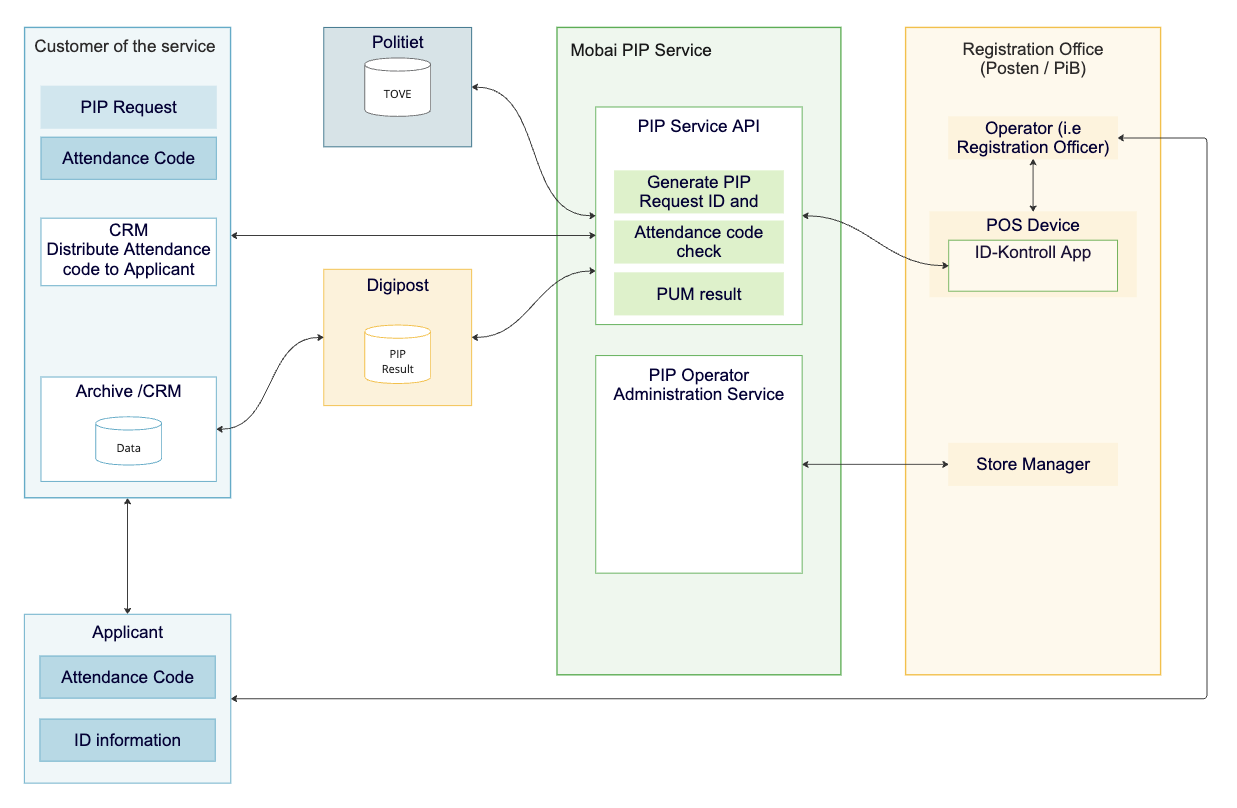
The PIP service consists of two main components developed by Mobai
PIP Service
The PiP service is a SaaS application hosted by Mobai that handles handles the PIP process.
It provides an API where PIP requestors can order PIPs and obtain results from a PIP session.
The service also handles the administration of PIP operators and the intake of identity proofing data from the ID-kontroll app. The PIP service also integrates with external services such as the Police registry for lost and stolen ID documents and Digipost for delivery of identity proofing results.
PIP - ID-kontroll app
The ID-kontroll application is an app developed for the Android operating system and used by the registration officer in the process to collect the data required to perform identity proofing.
The application is provided to the service provider responsible for the identity proofing session and managed through the service.
High level architecture
Data flow
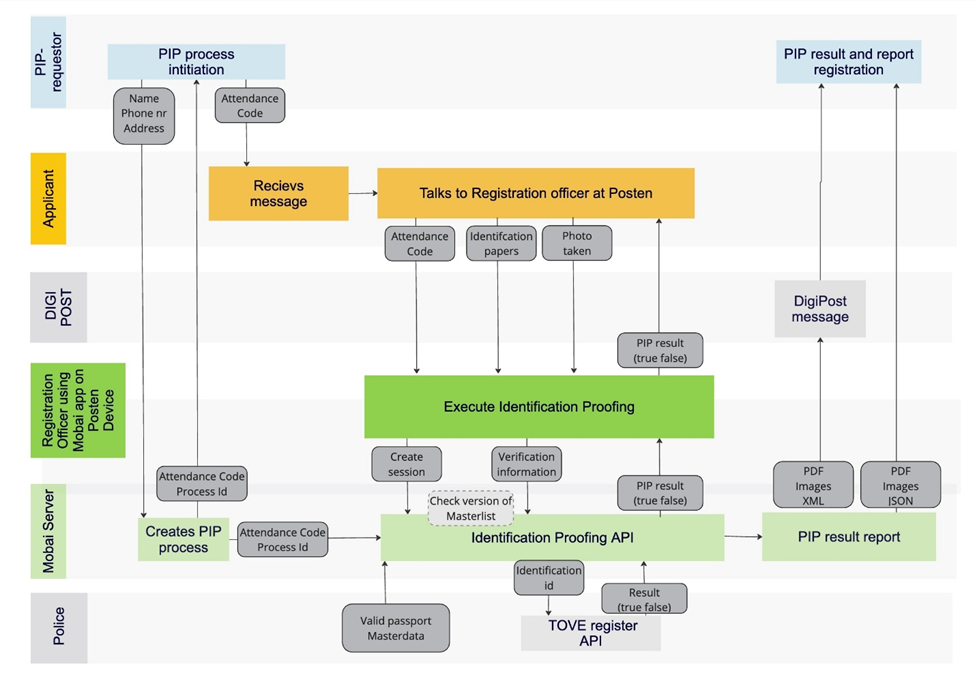
The data starts with the PIP-requestor (Mobai’s customer, typically a bank) sending a request to Mobai’s requestor-API. The API returns an Attendance Code (ID-kode) to be forwarded to their end user (applicant) and a unique ID following the process on a technical level.
The applicant will provide the attendance code (ID-kode) to the Registration Officer, upon arrival at the Merchant (post office) to identify the Request and start the Physical ID Proofing (PIP) process.
During the PIP process, the Registration Officer:
- Scans and takes pictures of the ID document
- Captures an image of the applicant
Applicant personalia information includes visual data and digital data sets from electronic passports/identity documents, such as personal data (name, date of birth, personal identification number) and associated non-personal data, such as security certificates.
This data, the results, and the captured facial image of the applicant, will be sent to backend service for biometric and other ID document controls. The backend service will perform controls and structure the data into PDF report, XML or JSON structured data, and image files.
Fetch result of PIP process - Direct integration or through Digipost
Direct integration
It is possible to download the result from the PIP directly through the API. This alternative implies integrating to Mobai and not using Digipost to receive the result of a PIP process given a PIP-ID. The following endpoints will be available:
- Data structured on JSON format
- JPEG images
- PDF document
URLs to the JPEG and PDF will be provided in the structured JSON document.
Receiving PIP results through Digipost
If the customer has given Mobai a Digipost address, the following will be sent to that address when doing a PIP:
- PDF report with relevant scans and images
- JPEG images
- XML with structured data (OBS! Some new fields compared to the old from PUM.)
Mobai will use the standard Digipost API to send the data to the PIP-requestor (https://www.digipost.no/bedrift/digipost-api). If no Digipost address is given, the PIP-requestor will use the “Fetch result of PIP” endpoint described in PIP-requestor API above.
The content of the XML will be as similar as possible to the current PUM solution, to enable reuse of existing solutions on the PIP-requestor side. Therefor there will be major naming differences between the JSON API described above and this XML. Also, this XML will have some empty fields, kept here only to match the existing PUM solution. Also note that the XML will contain some new fields.
Technical details for all endpoints
The API will be REST endpoint, using JSON to format structured data. Authentication will be done with OpenId 2.0 authentication or a api-key the https requests (Authorization: Bearer API-key).
The process of giving the authentication credentials needs to be secure. For this Mobai will use technical contact points email and phone number in the following sequence:
- A URL used to fetch the credentials will be sent to technical contact points email.
- The code needed to access the key through the URL, will be shared through a phone call or other channels defined as secure by Mobai guidelines.
Both parties will be able to request a renewal of the credentials at any time. Further details regarding the API will be provided through a Swagger specification/documentation.
Registration Officer Android App – "ID-kontroll"
This is the app running on Posten's devices. It will ensure that we can track who did the actual identification proofing and securely communicate with Mobai’s backend.
Technical Architecture of using Digipost
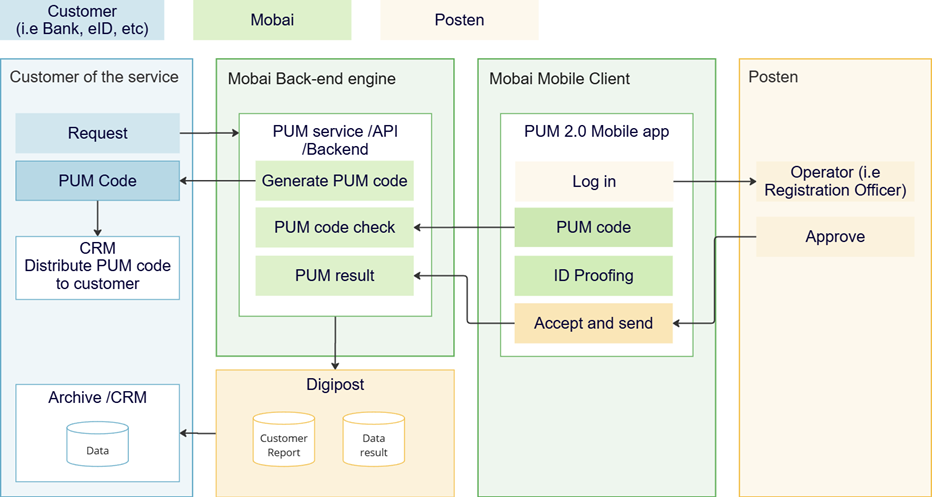
Technical implementation guide can be found here: https://www.mobai.dev/docs/pip/Introduction
Documentation of the API can be found here: https://test-api.pip.mobai.dev/docs (Swagger) & https://test-api.pip.mobai.dev/openapi (OpenAPI).
If the PIP-requestor wants to have PIP results sent to Digipost, Mobai will create a test account for you in Digipost’s test environment at https://www.test.digipost.no/. The PIP-requestor will then have the option to see the results from the PIP process by going to login, select “Logg inn med ID-Porten", “Test ID”, put the user ID provided by us in the “Personidentifikator” field and “Autentiser”. Then the PIP-requestor should be logged in to a user account Mobai can send post to.
Security
Our identity proofing platform implements comprehensive security measures designed to protect sensitive personal information, while serving multiple customers in a shared infrastructure. As a multi-tenant system handling customer data for competing organizations, security and data isolation are fundamental to our architecture. The platform leverages enterprise-grade encryption, strict access controls, and robust authentication mechanisms to ensure each customer's data remains segregated and secure. All security implementations are designed to meet industry compliance requirements, while providing flexible integration options for our customers.
Authentication & Authorization
- JWT token-based authentication with proper token expiration and refresh mechanisms
- Role-based access control (RBAC) ensuring customers can only access their own tenant data
- Multi-tenant data isolation through manual tenant validation in application logic to ensure customers can only access their own data
- Authentication options: Customers can choose between OAuth 2.0 (via Auth0) or API key authentication
- Multiple operator roles with restricted data access based on business needs
Data Protection & Encryption
- All customer data in Postgres secured with AES-256 encryption at rest
- TLS encryption for all API requests and internal communications
- Encryption keys and secrets managed through Azure Key Vault
- 30-day data retention policy with automatic deletion or anonymization of personal data
- Production data isolated on private Azure network infrastructure
API Security
- Rate limiting and throttling to prevent abuse
- Input validation and sanitization to prevent injection attacks
- CORS policies configured for authorized customer integrations
- Comprehensive logging of all API requests with sensitive customer information excluded from log files
- Support for both OAuth 2.0 and API key models to accommodate different customer security preferences
Database Security
- No direct database access - all operations through secure jump box within production network
- Encrypted database connections
- Prepared statements preventing SQL injection attacks
- Database user privilege separation
- Multi-tenant database design with manual tenant validation ensuring data isolation between customers
Infrastructure & Deployment Security
- Azure cloud hosting with dedicated environments (dev/staging/production)
- Private network for all production systems with no direct external access
- Jump box architecture ensuring controlled access to production resources
- Production environment access restricted to authorized personnel only
- Roll-forward deployment strategy for security updates
- Network segmentation and security groups
Development Process Security
- Comprehensive automated test suite covering security scenarios and tenant isolation
- Regular code reviews with security considerations as a standard review criterion
- Continuous CI/CD pipeline ensuring consistent and secure deployment processes
- Roll-forward only deployment strategy, eliminating rollback-related security risks
- All database schema changes via Flyway migrations reviewed for security implications
- Security considerations built into development workflow and testing processes
Compliance & Auditing
- Comprehensive audit logging for all customer data access
- External penetration testing conducted regularly
- Data retention and anonymization procedures
- Multi-tenant compliance ensuring customer-specific data governance
- All production access attempts logged and monitored
Monitoring & Incident Response
- Real-time monitoring for unauthorized access attempts
- Alerting for suspicious multi-tenant boundary violations
- Regular security monitoring and incident response procedures
- Access tracking through secure jump box infrastructure
Digipost
The integration with Digipost is encrypted via TLS. They require that all messages are signed with a certificate and hashed using SHA-256. More information about this can be found here: https://digipost.github.io/digipost-technical-docs/API/security.html
Description of result for XML, JSON and PDF
XML example file with description:
<?xml version="1.0" encoding="UTF-8"?>
<info>
<kollinr>PIP7108260625</kollinr> // <PIP><AttendanceCode><MMYY> (MMYY on ordered date)
<dato>26.06.2025, 10:16</dato> // Dato of completed ID-kontroll
<utleveringssted>Kiwi Sinsen</utleveringssted> // Location of ID-kontroll
<kundebehandler>Kari Pettersen</kundebehandler> // Name of customer operator
<navndokinnehaver>Ola Normann</navndokinnehaver> // Name from chip in ID-document
<navnfraedi>Ola Normann</navnfraedi> // Name from ordering of the ID-kontroll
<fnr>15031050012</fnr> // ID-number from chip.
<dnr></dnr> // ID-number/D-number when manually typed by operator
<idtype></idtype> // Type of ID-document from chip
<doknr>FKC003125</doknr> // Document number from chip
<utstedt></utstedt> // Issue country from chip
<gyldigtil>310212</gyldigtil> // Expiry date from chip
<tilleggsdok></tilleggsdok> // Not used
<MRZ-kode>P>NOR</MRZ-kode> // MRZ-code from chip
<Godkjent>True</Godkjent> // Approved status, "True" or "False"
<signaturassistent>0</signaturassistent> // Not used
<kontrollstatus>Automatisk</kontrollstatus> // Will always be "Automatisk"
<RFIDlest>True</RFIDlest> // If the chip has been read or not
<MRZValid>True</MRZValid> // Check if chip is valid or not
<UVValid>False</UVValid> // Not used
<IRValid>False</IRValid> // Not used
<Avbrudsgrunn></Avbrudsgrunn> // Reason for cancellation
<AnsiktssammenligningA>True</AnsiktssammenligningA> // If biometric facial comparison has been conducted
<ScoreAnsiktammenligning>0.857168014232929</ScoreAnsiktammenligning> // Result from biometric comparison
<AnsiktssammenligningM>True</AnsiktssammenligningM> // Operator's assessment of whether the person and the ID document match
<StatusFraTOVE>UNKNOWN_DOCUMENT</StatusFraTOVE> // Norwegian Police's Lost and stolen register current status
<RfidPassivAutentisitet>AUTHENTICATED</RfidPassivAutentisitet> // Passive authentication status
<RfidActiveAutentisitet>AUTHENTICATED</RfidActiveAutentisitet>
</info> // Active authentication status
JSON example file with description:
{
"pipId": "01993913-8a9d-72e8-afe3-acd18ddde2bf", // UUID per ID-kontroll
"approved": true, // Approved status, "true" or "false"
"applicantName": "Åsamund Specimen Østenbyen", // Name from ordering of the ID-kontroll
"locationOfProofing": "Lagunen Post i Butikk, Obs Lagunen", // Location of ID-kontroll
"dateOfProofing": "2025-09-11T14:01:16.431098Z", // Dato of completed ID-kontroll
"registrationOfficer": "Ola Nordmann", // Name of customer operator
"idType": "ID-Kort", // Type of ID-document from chip
"nationalIdNumber": "23045612345", // ID-number from chip
"dNumber": "41018512345", // The dNumber field is only included in the JSON if a value is provided. The value is entered manually by the operator.
"documentHolder": "ÅSAMUND SPECIMEN ØSTENBYEN", // Name from chip in ID-document
"documentHolderSurname": "ØSTENBYEN", // Surname from chip
"documentHolderGivenNames": "ÅSAMUND SPECIMEN", // Given names from chip
"gender": "MALE", // Gender extracted from chip
"nationality": "NOR", // Nationality code extracted from document (ISO 3166-1 alpha-3)
"birthdate": "1956-04-23", // Birth date extracted from document in ISO format
"mrzCode": "XANORJGD0004758230456<12345<<<, 5604230M2606118XXX<<<<<<<<<<<9, OESTENBYEN<<AASAMUND<SPECIMEN<", MRZ-code from ID-document
"mrzValid": true, // Check if chip is valid or not
"nfcDataIssuer": "NOR", // Issuer of the NFC data (ISO 3166-1 alpha-3)
"nfcDataDocNumber": "CCC002251", // Document number from chip
"nfcDataValidUntil": "2025-06-01", // Expiration date from chip
"toveStatus": "NO_MATCH", // Norwegian Police's Lost and stolen register current status
"automaticRfidRead": true, // Check if chip is valid or not
"automaticBiometricComparisonApproval": true, // If biometric facial comparison has been conducted
"automaticBiometricComparisonScore": 0.82224152, // // Result from biometric comparison from 0 to 1
"automaticRfidPassiveAuthentication": "AUTHENTICATED", // Status of automatic RFID passive authentication
"automaticRfidActiveAuthentication": "AUTHENTICATED", // Status of automatic RFID active authentication
"manualBiometricComparisonApproval": true, // Indicates if the manual biometric comparison was approved
"terminationCause": null, // Reason for termination when approval is null (processing not done)
"chipImage": "https://pip.api.mobai.cloud/v1/{pipId}/result/chipImage", // Url to download image from chip
"identityCardImage": "https://pip.api.mobai.cloud/v1/{pipId}/result/identityCardImage", // Url to download image of identity card
"identityCardImage2": "https://pip.api.mobai.cloud/v1/{pipId}/result/identityCardImage2", // Url to download image of identity card
"personImage": "https://pip.api.mobai.cloud/v1/{pipId}/result/personImage", Url to download image of person
"pdf": "https://pip.api.mobai.cloud/v1/{pipId}/result/pdf" // Url to download pdf report
}
PDF:
The PDF have the fields from the ID-kontroll almost similar to the JSON. Please send a mail to support@mobai.bio to see a sample PDF.
Note about the “Approved” / “Godkjent” field: The value indicates the outcome of the verification process. For details on how this value is determined, please contact us directly.
Activation/Delivery ("Aktivering"/"Utlevering")
Please contact us if you have any specific requirements regarding delivery or activation of eIDs, secrets or authentication factors.